
DIGITAL JUDGING & SCORING SOFTWARE

Digital Judging & Scoring Software for Events

Let judges evaluate. Let the software handle the totals.

Replace scattered score sheets with a structured evaluation process.

Technanosoft develops custom digital judging and scoring software for innovation challenges, pitch competitions, hackathons and awards. Give judges a clear place to review entries, score agreed criteria and submit evaluations—while organisers track progress and prepare results.

Concept illustration of judges independently scoring a presentation on tablets, with a separate organiser review workspace.HUMAN JUDGEMENT. A STRUCTURED WORKFLOW.
01 Evaluate02 Calculate03 Approve
AI-generated concept illustration. Screens and event setup are illustrative.
YOUR COMPETITION. YOUR CRITERIA.

Your criteria. Independent evaluations. Organiser-controlled results.

FROM EVALUATIONS TO AN ANNOUNCEMENT

The presentation ends.
The spreadsheet work shouldn’t begin.

One judge has finished scoring. Another has saved a draft. A third has missed a criterion. Your team needs to know what is complete before calculating the results.

Bring those evaluations into one organised workflow.

Judges focus on the presentation in front of them. Organisers see which submissions are ready, which need attention and when the results can be reviewed.

Know who has scored. Know what is missing.
Know when the results are ready.

THE EVALUATION JOURNEY

From presentation assignment
to reviewed results.

Build the judging process around your competition rules, evaluation criteria and approval requirements.

  1. 01

    Set the Judging Rules

    Define the entries, rounds, criteria and scoring scales. Agree how scores will be combined, how incomplete evaluations are handled and what happens when entries finish with the same result.

  2. 02

    Assign Presentations to Judges

    Give each judge access to the presentations or entries they need to evaluate. Include the relevant team details, summaries and supporting information within the agreed workspace.

  3. 03

    Score, Comment & Submit

    Judges enter scores against the defined criteria and add comments where required. Distinguish work in progress from a final submission so organisers know which evaluations are complete.

  4. 04

    Review & Release Results

    Calculate results using the agreed scoring method. Let authorised organisers check completion, review exceptions and approve what is shared with the audience.

Define the rules Assign entries Collect evaluations Review and release results

BEHIND THE EXPERIENCE / DFDs

Independent evaluations.
A controlled route to results.

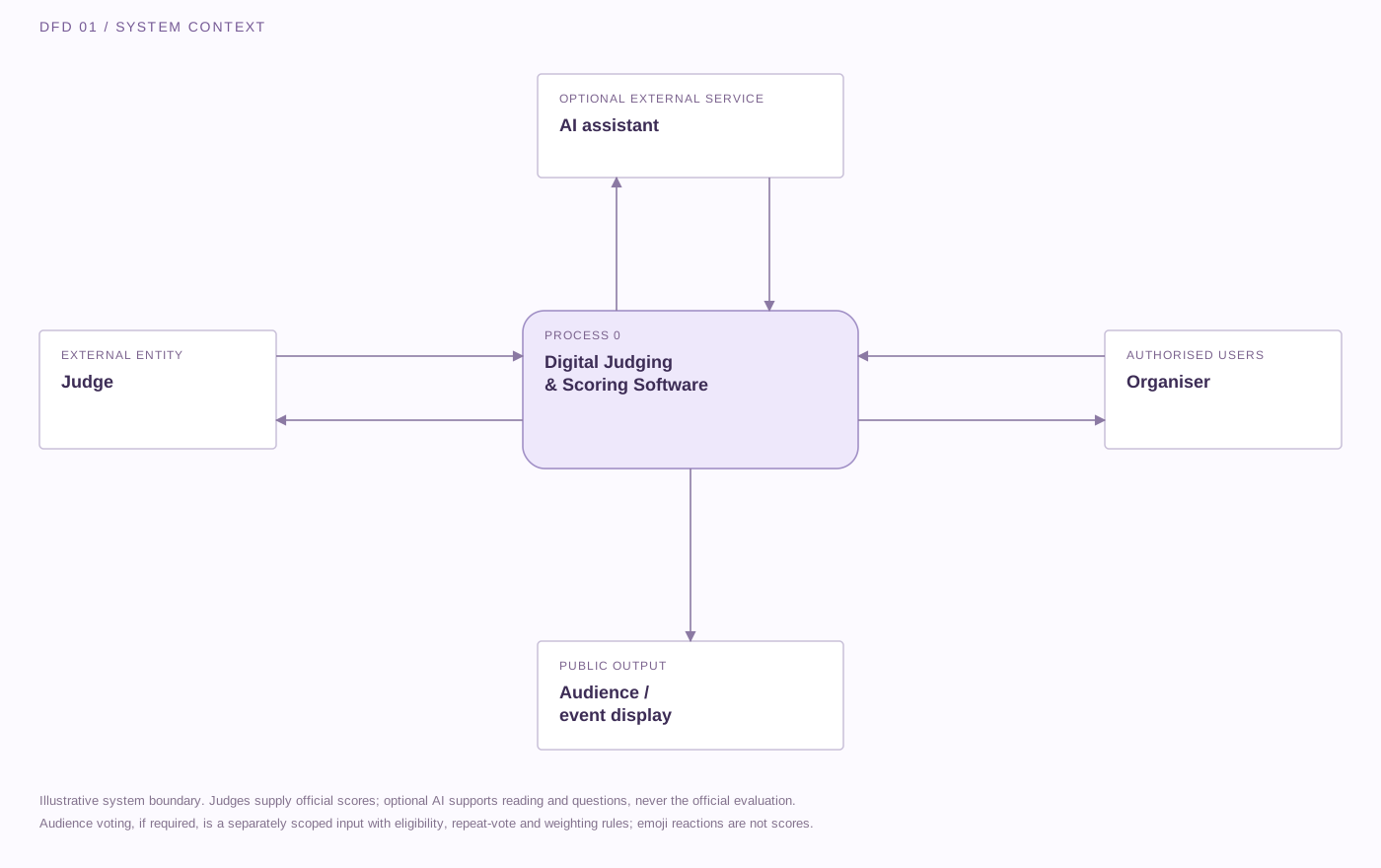
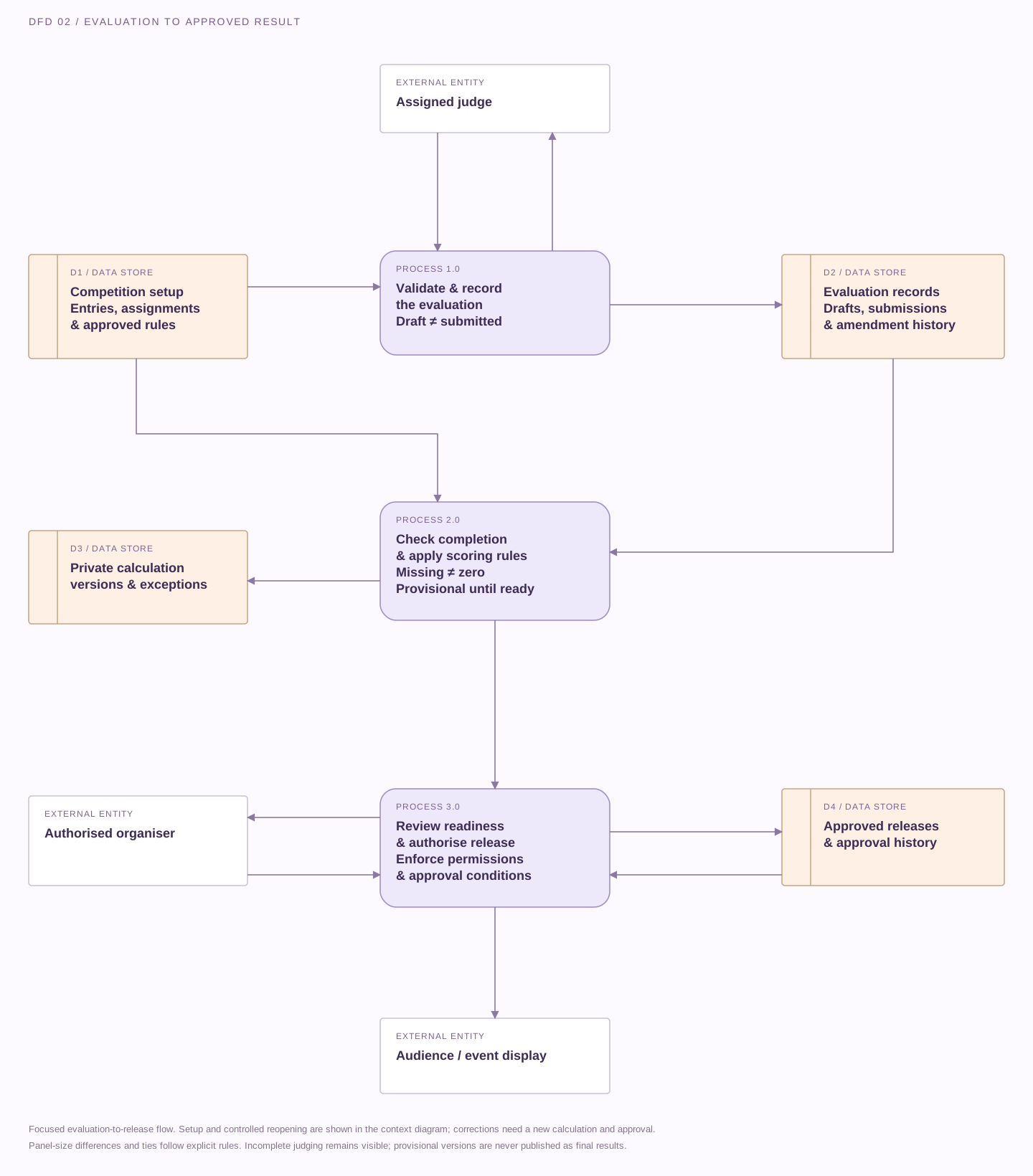
Follow the information from assigned entries to submitted evaluations and approved results. These illustrative data-flow diagrams describe a possible design; access, scoring rules, storage and optional integrations are agreed for your event.

Download SVG
Data-flow diagram connecting judges, authorised organisers, optional AI assistance and a public display. Only judges supply official scores and only approved results reach the audience.

Judges receive assigned entries and criteria and submit their own scores and comments. Organisers define the rules, monitor completion and approve publication. An optional AI assistant receives approved entry information and returns summaries or suggested questions, never official scores. Public displays receive only the selected, authorised release. Audience voting is a separate component to scope.

External entity Process Data store→ Labelled data flow
Open full size ↗

On smaller screens, scroll across the diagram or open it full size.

Incomplete never means zero. Drafts and missing evaluations stay distinct from submitted scores. Completion conditions determine when results are ready for approval.

AI assistance stays separate. An optional assistant can summarise approved entry information or suggest questions. Only judges supply official scores.

Publish an approved result. Private scores, comments and provisional rankings stay in the organiser workflow. Public displays receive only the selected, authorised release.

FEATURES & CUSTOMISATION

Build the scoring system
around your competition.

Choose the capabilities that fit your event. Criteria, judge access, result calculations and optional AI assistance are defined within the custom project scope.

Custom Criteria & Scoring Scales

Set the areas judges should evaluate and the points available for each. Use a consistent scale, such as 0–20, or define a different maximum where the competition requires it.

Criteria descriptions can explain what judges should consider before entering a score.

OPTION TO SCOPE


Presentation Details & Judge Assignments

Organise the entries, teams and supporting information in one place. Assign judges to the appropriate presentations, categories or rounds so their workspace reflects the evaluations they are responsible for completing.

OPTION TO SCOPE

A Dedicated Judge Workspace

Give judges a focused interface for reviewing entry details, entering scores and adding comments. Plan the layout for the selected tablet, iPad or computer, with clear navigation between assigned entries.

OPTION TO SCOPE

Draft Saving & Final Submission

Let judges save work in progress without treating it as a completed evaluation. Define required fields, submission checks and the point at which an evaluation becomes locked.

Any reopening or amendment process should follow the organiser’s agreed rules.

OPTION TO SCOPE

Organiser-Only Progress Dashboard

Show authorised organisers which evaluations are pending, in progress or submitted. Identify incomplete judging assignments before the results are prepared, rather than chasing individual judges without knowing what remains outstanding.

OPTION TO SCOPE

Automatic Totals & Provisional Rankings

Calculate scores using the approved aggregation method. Apply defined weighting, round rules and tie handling where included.

Keep rankings marked as provisional while required evaluations remain incomplete. A missing submission should not silently become a zero score.

OPTION TO SCOPE

Results Reports & Review History

Scope the reports organisers need, such as entry totals, criterion-level scores, completion status and judge comments. Define who can export results and what submission or amendment history needs to be retained.

OPTION TO SCOPE

Controlled Access & Result Publishing

Keep administrative controls separate from the judge interface. Define whether judges can view only their own evaluations and when organisers can release rankings or selected results to an event display.

OPTION TO SCOPE

Optional AI Assistance

Add an “Ask AI” workspace to help judges summarise approved entry information or prepare follow-up questions.

Keep AI suggestions distinct from official evaluations. Judges enter their own scores, and authorised organisers retain control over the final result.

OPTION TO SCOPE

FOR JUDGES & ORGANISERS

Less score chasing.
More attention on the ideas.

Discuss Your Judging Software
01 / For Judges

A Clear Evaluation Structure

Present the criteria, scoring controls and relevant entry information together. Help judges work through their assigned evaluations without switching between separate documents and score sheets.

02 / For Organisers

Visibility Before the Final Calculation

See whether the required judging is complete. Identify missing evaluations, unfinished drafts and exceptions before preparing the result for announcement.

03 / For Competition Teams

Consistent Calculation Rules

Apply the same agreed scoring method throughout the competition. Keep the calculation separate from the judgement itself: the software combines submitted scores, while judges remain responsible for their evaluations.

04 / For Event Production

Control Over What Appears on Screen

Plan public results separately from private judging activity. Release the approved information at the right point in the programme without exposing working scores, comments or administrative screens.

DIFFERENT COMPETITIONS. DEFINED CRITERIA.

Adapt the judging process
to the event.

The following examples illustrate possible configurations, not previous client results.

Concept illustration of an engineer presenting a prototype to judges using separate tablets in a corporate innovation studio.EVENT CONCEPT 01
AI-generated concept illustration

Innovation Challenges & Internal Pitch Programmes

Give judges a structured way to evaluate ideas against the programme’s objectives. Keep presentation information, criterion scores and feedback connected to the relevant entry.

EXAMPLE SETUP

Six equally weighted criteria, each scored from 0 to 20, giving a maximum of 120 points per judge.

Concept illustration of a founder presenting to an independent judging panel with private tablet workspaces.EVENT CONCEPT 02
AI-generated concept illustration

Startup Pitch Competitions

Build an evaluation process around the competition’s agreed criteria, such as problem clarity, proposed solution, feasibility and presentation quality.

EXAMPLE SETUP

Assigned judging panels submit independent evaluations before organisers review the combined results.

Concept illustration of developers demonstrating a working garden technology prototype to a judge with a tablet.EVENT CONCEPT 03
AI-generated concept illustration

Hackathons & Technical Showcases

Support evaluations of working demonstrations, prototypes and team presentations. Define the scoring requirements for each round rather than treating every stage as the same assessment.

EXAMPLE SETUP

Preliminary evaluations identify finalists, followed by a separately configured final judging round.

Concept illustration of organisers reviewing evaluations backstage before an awards announcement.EVENT CONCEPT 04
AI-generated concept illustration

Awards & Presentation Contests

Organise category-based judging with defined criteria and controlled result access. Give organisers visibility into completion without sharing other judges’ scores where independent assessment is required.

EXAMPLE SETUP

Judges evaluate assigned categories, with results held for review before the award announcement.

WHY TECHNANOSOFT

Software that supports decisions
—not replaces them.

Technanosoft has delivered judges scoring software alongside other event applications, including registration and badge printing, interactive games, selfie kiosks and live audience reactions.

We bring that project experience into planning the evaluation workflow, participant screens and organiser controls.

Explore our event software
01

Start With the Rules, Not the Dashboard

Define how the competition works before designing the score display. Criteria, assignments, submission rules and result calculations should reflect the organiser’s approved process.

02

Keep Judges Focused

Give judges the information and controls needed for their evaluations. Keep administrative functions and unrelated event activity outside their workspace.

03

Plan for What Happens Before the Announcement

Missing submissions, tied results and approved score corrections need a defined process. Address these situations during development rather than improvising while the audience waits.

OUR DEVELOPMENT PROCESS

From judging rules
to a rehearsed scoring workflow.

The calculation matters. So does knowing when the result is ready to announce.

  1. 01

    Define the Evaluation Model

    Share your event format, number of entries, judging panel and competition rounds. Agree the criteria, score ranges, weighting, submission requirements and result-approval process.

  2. 02

    Design the Judge & Organiser Screens

    Map the judge’s journey from login to final submission. Design a separate organiser workspace for assignments, completion tracking, result review and approved publishing.

  3. 03

    Build & Validate the Calculations

    Develop the agreed scoring workflow and administrative controls. Check calculations against worked examples, including incomplete evaluations, different panel sizes and tied scores where relevant.

  4. 04

    Rehearse the Event Process

    Test the software on the selected devices. Walk through draft saving, final submission, authorised corrections, interrupted connections and result release using representative entries and judging assignments.

BEFORE WE BUILD

Questions About
Digital Judging & Scoring Software

Practical details for planning your experience.

Discuss Your Judging Software
01What is digital judging and scoring software?

Digital judging software gives judges a structured way to evaluate entries against defined criteria. It brings presentation details, score entry, comments and submission status into one application.

An organiser-facing workspace can track completion and calculate results using the competition’s agreed rules.

02Can we customise the criteria and scoring scale?

Yes. The project can include configurable criteria, descriptions and score ranges.

For example, six equally weighted criteria scored from 0 to 20 produce a maximum of 120 points per judge. Different weighting or scoring limits can be included, with the calculation method agreed and tested before use.

03How are scores from multiple judges combined?

The method is defined around your competition rules. It may use a total, an average or a weighted calculation.

The design should account for the number of judges assigned to each entry. Comparing raw totals from different-sized panels can create misleading rankings unless the rules explicitly address that difference.

04What happens when a judge has not finished scoring?

Incomplete evaluations should remain visibly separate from final submissions. The organiser dashboard can show which assignments still need attention.

The project should define whether provisional results may be viewed and what completion conditions must be met before final rankings are approved.

05Can judges change a score after submitting it?

That depends on the agreed submission policy. Scores can be locked after submission, or authorised organisers can be given a controlled process for reopening an evaluation.

Where changes are permitted, define what amendment history is recorded and how the updated score affects previously calculated results.

06Can judges use iPads or tablets?

The judge interface can be designed for the selected iPads, tablets or computers.

Screen size, orientation, input controls and the operating environment should be confirmed during planning. Testing on the intended devices helps ensure that scoring, comments and navigation work comfortably in the event setting.

07Can rankings stay private until the announcement?

Yes. Private evaluation screens and public result displays can be treated as separate parts of the application.

Define who can see provisional rankings, who approves the final result and who can publish it. A public screen should display only the information authorised for release.

08Can the software work without an internet connection?

Local-network or offline requirements can be assessed during scoping.

The design needs to account for where evaluations are stored, how submissions are confirmed and what happens when devices reconnect. Offline scoring and live shared rankings require different arrangements, so the complete workflow needs to be tested.

09Does AI score the entries or choose the winners?

The optional AI assistant described here supports tasks such as summarising approved entry information and suggesting follow-up questions. It does not replace the judging panel.

Official scores come from judges. Result calculations follow the agreed rules, and final approval remains with the authorised organisers.

10Can audience votes or reactions be included?

Audience participation can be discussed as a separate component. Emoji reactions should not automatically become judging points.

Where audience voting contributes to the result, define eligibility, repeat-vote handling and its weighting in advance. Keep the audience contribution distinguishable from the judging panel’s scores.

11How much does custom judging software cost?

Pricing depends on the number of workflows, competition rounds, scoring rules, judge assignments, reporting needs and integrations.

The estimate should separate software development from any applicable hosting, AI-service usage, devices and on-site operating support. Share your event date and evaluation requirements so the scope reflects the actual competition.

YOUR NEXT COMPETITION, CLEARLY STRUCTURED

Give every evaluation a clear path to the result.

Tell us how your competition works, what judges need to assess and how the final decision should be reviewed.

We’ll help define the judging software, scoring workflow and organiser controls around your event.

Share your event date, expected entries, judging panel size and scoring criteria.

Let’s Plan Your Digital Judging System

Tell us what you have in mind. Event details can be confirmed later.

Your contact information and event idea

We’ll use these details to respond to your enquiry. Privacy policy.