Technanosoft Insights
AI Automation for Accounting Firms: A Controls-First Guide
A controls-first guide to choosing accounting workflows for AI automation, separating preparation from professional authority, and planning recoverable integrations.

A controls-first guide to choosing accounting workflows for AI automation, separating preparation from professional authority, and planning recoverable integrations.
FINANCE & ACCOUNTING SOFTWARE
AI automation for accounting firms works best when it prepares repetitive work, applies explicit rules, and sends judgment or consequential actions to the right reviewer. The goal is not an autonomous accountant; it is a controlled workflow that connects documents, practice systems, accounting platforms, approvals, and evidence without letting uncertain output become an unauthorized posting, payment, filing, or client message.
Draft for internal editorial review · Approximately 15 minutes

Quick answer
Start AI automation in an accounting firm with frequent, evidence-rich work that can stop before a consequential action: document collection, intake classification, field extraction, checklist comparison, reconciliation preparation, or draft follow-ups. Use deterministic rules for required fields, thresholds, permissions, deadlines, and state changes. Keep professional judgment, ledger posting, payment release, filing, sign-off, and sensitive client communication behind explicit human authority unless the firm has approved a much narrower rule-based action.
Key takeaways
| Decision | Practical answer |
|---|---|
| Best first workflow | Repetitive preparation with reachable source evidence and a named reviewer |
| Use rules for | Required data, thresholds, calendars, permissions, routing, duplicate control, and writes |
| Use AI for | Variable documents, classification, candidate extraction, summaries, and evidence-backed drafts |
| Keep controlled | Posting, payment, filing, sign-off, judgment, and external communication |
| Buy vs build | Buy the accounting system; integrate or build only the workflow layer that is genuinely specific |
On this page
- Who this guide is for
- What accounting-firm AI automation means
- What should an accounting firm automate first?
- The Prepare, Recommend, Commit boundary
- Six planning questions
- Workflow and architecture
- Implementation scope and value
- Buy, integrate, build, or defer
- Choose it when—or avoid it
- Risks and failure controls
- Provider selection
- Technanosoft's approach
- FAQs
- The decision in one minute
Who this guide is for
This guide is for a US accounting, bookkeeping, or client-accounting-services firm whose operations leader needs to reduce repeated document handling, status chasing, reconciliation preparation, or system re-entry without weakening review. It is general workflow and software guidance—not accounting, tax, attest, audit, legal, privacy, security, or professional advice. The firm's qualified service-line, compliance, security, and legal reviewers must approve the actual use.
What accounting-firm AI automation means
Accounting-firm automation connects a trigger—such as a client upload, inbox message, deadline, bank-feed change, or close checklist—to a controlled series of software actions. Ordinary code may collect records, compare fields, apply thresholds, route work, update status, and write approved data. AI may classify a variable document, extract candidate values, summarize evidence, suggest categorization, or draft a message.
Those are different jobs. A model's confident suggestion is not an authorization. A workflow becomes dependable only when it defines the source evidence, allowed task, reviewer, stop condition, final system of record, and recovery path.
AICPA & CIMA guidance advises accounting professionals to understand a tool's limits and data handling, verify outputs, and maintain oversight rather than delegate professional responsibility to AI (AICPA & CIMA). NIST's voluntary AI Risk Management Framework likewise calls for documented human-AI roles, targeted scope, oversight, testing, and monitoring (NIST AI RMF Core). These sources do not certify a product or replace firm-specific obligations; they reinforce a practical design principle: scope the system before granting it authority.
What should an accounting firm automate first?
Start with preparation, not professional sign-off. The strongest first workflow is frequent enough to measure, has accessible evidence, follows a describable normal path, exposes recognizable exceptions, and can pause in a review queue.
| Workflow | Good automation job | Use rules for | Keep human-controlled |
|---|---|---|---|
| Client document collection | Compare required records with received files; prepare a reminder | checklist, due date, prior request, client preference | sending sensitive or unusual requests; changing the engagement plan |
| Document intake | Classify files and extract candidate fields | client/entity match, required fields, duplicate checks | accepting an ambiguous document; resolving conflicting evidence |
| Transaction review | Surface unusual items and prepare coding suggestions with support | known mappings, thresholds, period/entity checks | accounting treatment, unusual classification, final posting |
| Reconciliation preparation | Match known records and assemble differences | exact/approved match rules, tolerance, cutoff | investigating unexplained differences; approving resolution |
| Month-end close | Track checklist status and collect evidence packages | task dependencies, due dates, completeness gates | close sign-off, estimates, accrual judgments, representations |
| Client communication | Draft status updates or information requests | approved templates, recipient rules, escalation flags | nuanced advice, complaints, commitments, or final client-facing send |
| Payment, filing, or payroll | Prepare the package and verify prerequisites | required approvals, limits, completeness, duplicate prevention | release, submission, authorization, and exception decisions |
KPMG's financial-reporting automation guide illustrates this general control pattern: automation can perform defined matching or reconciliation steps, while differences outside thresholds continue to receive staff investigation and manager review (KPMG guide, pp. 31–33). The exact control design still depends on the firm's services, systems, clients, and obligations.
The Prepare, Recommend, Commit boundary
Use this three-zone model to decide how much authority an automation should receive.
- Prepare: collect records, normalize files, match the client and entity, compare a checklist, calculate a deterministic difference, and assemble evidence. Preparation should be traceable and reversible.
- Recommend: classify, extract, summarize, prioritize, propose a code, draft a note, or explain why an item needs review. Recommendations must remain visibly provisional.
- Commit: post to the ledger, release payment, submit a filing, sign off work, change an engagement state, or send external communication. A commit action changes an authoritative record or creates an obligation.

This is an editorial planning model, not a professional standard or claimed proprietary methodology. Its purpose is to force one useful question: What is the most consequential thing this workflow can do, and who has authority to allow it?
An automated commit is not always wrong. A narrow, deterministic, reversible update may be approved to run without a person on every item. But that decision should be explicit and based on consequence, evidence quality, error detection, rollback, monitoring, and accountability—not on a model confidence score alone.
Six planning questions
Use these questions before selecting a product or model:
- Workflow: What event starts the work, what marks completion, and which seasonal or deadline conditions change the path?
- Users: Who prepares, reviews, approves, overrides, repairs, and owns the workflow after launch?
- Data: Which client, entity, period, source document, ledger, and practice record is authoritative for each field?
- Integrations: Which practice-management, document, email, portal, accounting, payroll, tax, payment, or reporting system participates?
- Intelligence: Which tasks are exact rules, which benefit from AI, and which require professional judgment?
- Control: What creates an automatic pass, warning, hard stop, human review, rollback, incident, or reprocessing task?
This keeps “AI automation” from becoming a vague purchase. It turns the project into a testable operating change.
Workflow and architecture
The architecture should keep source evidence, candidate data, deterministic validation, human authority, and the final system write separate. It also needs an explicit path for duplicate events, expired authorization, integration downtime, rejected writes, and reviewer correction.
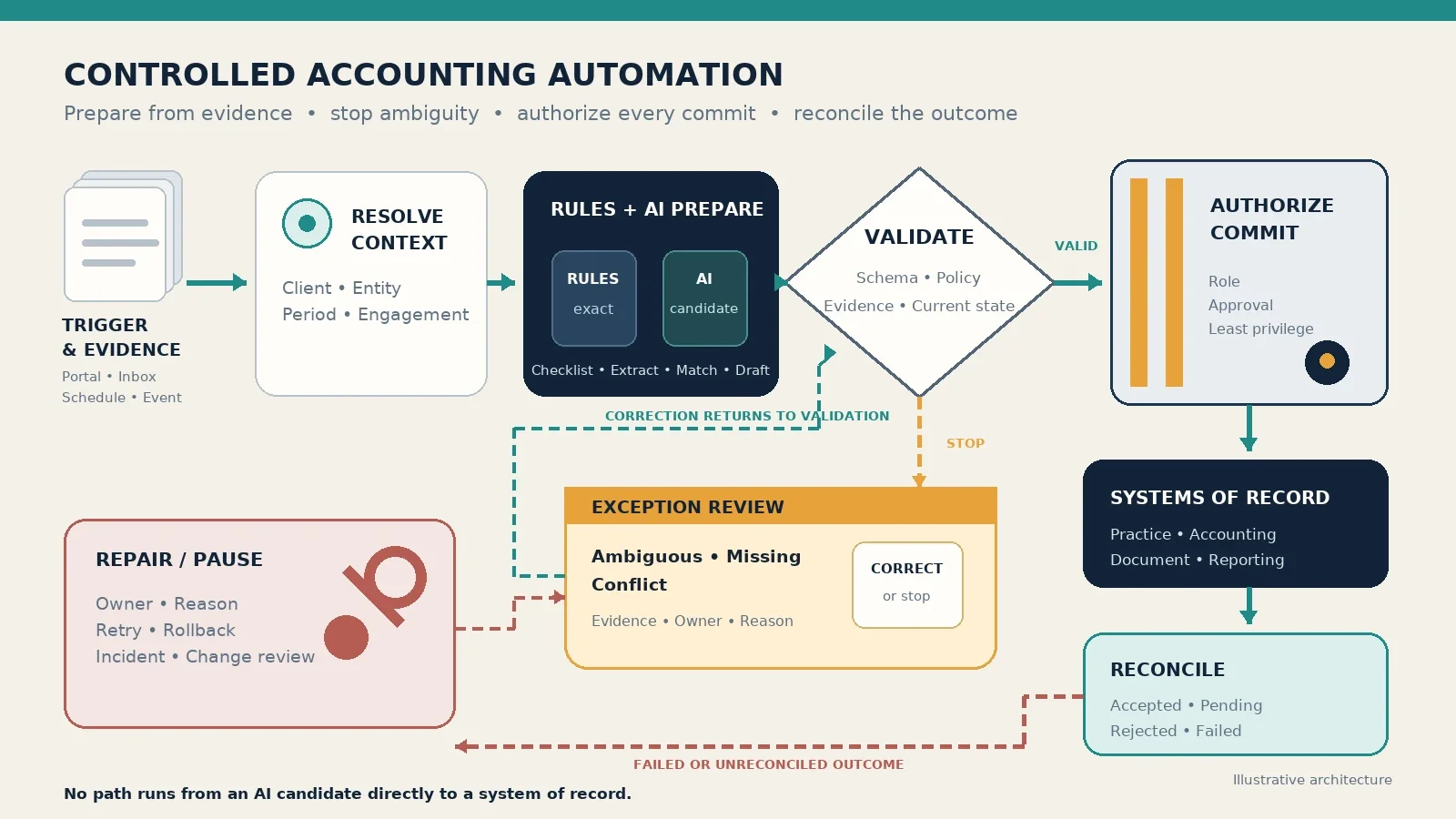
- Receive the trigger. Capture a portal upload, inbox message, scheduled checklist, webhook, or approved user action. Assign a correlation key and preserve the original evidence.
- Resolve context. Identify the client, legal entity, engagement, period, document type, and intended destination. Ambiguity becomes a queue item—not a guess.
- Prepare with rules and AI. Exact code handles checklists, known mappings, dates, thresholds, and duplicates. AI handles variable layouts, classification, candidate extraction, summaries, or drafts where it adds value.
- Validate. Check schema, completeness, entity and period, cross-record consistency, policy, and allowed action. Record both failures and unavailable evidence.
- Review exceptions. Show the source, proposed value, conflicting records, rule result, model version where relevant, and the decision a qualified reviewer is being asked to make.
- Authorize the commit. Confirm role, scope, approval, and current state immediately before any consequential write or external send.
- Write and reconcile. Update the target through its supported interface, record the response, prevent unintended duplicates, and verify that the authoritative systems agree.
- Monitor and improve. Measure exception patterns, corrections, failed writes, review burden, latency, and incidents. Pause or narrow the workflow when its evidence or behavior changes.
For example, QuickBooks Online webhooks require a connected company to authorize the app through OAuth 2.0 (Intuit developer documentation). That illustrates a broader integration truth: a workflow must manage real authorization, supported entities, event behavior, and destination responses. Screen automation or a browser-driving agent does not remove those operating responsibilities.
A 2026 accounting field study describes a GenAI-enabled, human-in-the-loop platform in which recommendations remained subject to accountant review. The authors also caution that observed productivity trends in their setting are not a standalone causal adoption effect (Journal of Accounting Research). Use research like this as evidence that controlled workflows are feasible—not as a universal ROI promise.
Where ordinary software is better than AI
Use ordinary software when the input is structured, the rule is explicit, and the result must be repeatable: required-field checks, deadline calculations, exact matches, role permissions, duplicate prevention, approved mappings, state transitions, and ledger-write contracts. Use configuration in an existing product when it already expresses the workflow safely.
AI is most defensible where the input is variable or language-heavy and a reviewer can inspect the evidence. Adding a model to a stable checklist or exact reconciliation rule increases cost and uncertainty without necessarily improving the decision.
Implementation scope and value
Do not accept a project estimate until the workflow, integrations, evidence, exceptions, and commit boundary are defined. “One accounting automation” may be a configured reminder rule or a multi-client document pipeline with separate credentials, review roles, audit events, and recovery operations.
| Scope driver | Lower complexity | Higher complexity |
|---|---|---|
| Clients/entities | one internal entity | many clients with strict separation and varying policies |
| Inputs | structured export or one clean form | email, portal, scans, spreadsheets, statements, and free text |
| Decision | exact checklist or mapping | contextual categorization, unusual transactions, or professional judgment |
| Integrations | one supported API | practice suite, document store, several accounting platforms, tax/payroll/payment tools |
| Review | one queue and role | service-line routing, dual approval, seasonal capacity, conflicts, and escalation |
| Operations | manual replay | monitored retries, idempotency, reconciliation, model/rule versions, and incident response |
For a transparent workload baseline:
Potential monthly hours released = monthly items × current minutes per item × eligible automation share ÷ 60
Then subtract reviewer time, exception handling, corrections, monitoring, software/model fees, integration maintenance, support, training, and implementation effort. Released time is capacity—not automatically cash savings or reduced headcount. Measure the current workflow and pilot exception burden before discussing net benefit.
A practical first-release sequence
| Stage | Deliverable | Exit condition |
|---|---|---|
| Baseline | workflow map, volumes, evidence sources, exception taxonomy | team agrees on the current normal and exception paths |
| Boundary | Prepare/Recommend/Commit classification and authority matrix | every consequential action has an owner and stop rule |
| Pilot | one client segment or workflow with a review queue | representative inputs and failures are measured |
| Integration | approved destination writes and reconciliation | duplicates, expired access, and partial failures are recoverable |
| Operating control | monitoring, support, change review, and pause mechanism | the firm can detect drift and stop safely |
| Expansion | additional clients, document types, or actions | previous controls still work under the new variation |
Buy, integrate, build, or defer?
Buy the accounting system of record. Most firms should not build a general ledger, tax engine, payroll engine, or commodity practice platform. The actual decision is whether to configure a product, integrate several existing products, or build a focused workflow layer around them.
| Path | Choose it when | Main trade-off | Evidence to request |
|---|---|---|---|
| Buy/configure | a product supports the workflow, systems, client separation, review, and evidence | fastest path but limited control and vendor dependence | real exception demo, permissions, export, retention, integration limits, support |
| Integrate | core products fit, but cross-system handoffs and firm rules create the gap | interfaces, credentials, mapping, and failure states become your responsibility | API/webhook contracts, retries, reconciliation, versioning, and ownership |
| Build a focused layer | the workflow is durable, specific, valuable, and underserved by configuration | highest engineering and operating responsibility | representative corpus, support owner, security model, maintenance plan, exit path |
| Defer | volume is low, policy is changing, evidence is unreliable, or exceptions dominate | manual effort remains but premature automation is avoided | baseline and a measurable trigger for revisiting the decision |
Do not evaluate a tool from its clean demo. Ask it to process the wrong entity, an unreadable statement, a duplicate file, a closed period, an expired connection, a conflicting vendor record, and a rejected destination write.
Where controlled automation creates value
- Client intake: classify uploads, resolve the client/entity/period, compare required records, and prepare missing-item requests.
- Bookkeeping preparation: extract candidate fields and supporting evidence, apply approved mappings, and route unusual transactions.
- Reconciliation preparation: assemble matched items, calculate deterministic differences, and place unexplained items in the correct review queue.
- Close coordination: track dependencies, gather support, surface overdue work, and prevent sign-off until required evidence is present.
- Practice operations: update internal status, assign work, summarize queue health, and alert owners without changing accounting conclusions.
- Reporting preparation: collect approved data and draft narrative summaries, while keeping interpretation and client-facing release controlled.
Technanosoft's public finance/accounting page also describes an AI OCR application that extracts invoice data, supports human correction, and connects with QuickBooks; it explicitly reports no measured time-saving or accuracy result (Technanosoft finance/accounting software). That is the right evidence boundary: a relevant capability without an invented performance claim.
Choose it when—or avoid it
Choose controlled automation when the work is repeated, source evidence is reachable, the normal path is explainable, exceptions can stop, and a named owner can review or repair the result. It is especially useful when staff currently move the same facts across inboxes, portals, spreadsheets, practice systems, and accounting platforms.
Avoid AI when a standard product configuration or deterministic rule solves the problem. Avoid a custom build when the workflow is temporary, low-volume, undocumented, or already well supported by the current platform. Do not automate a professional decision merely because the input can be summarized. First fix inconsistent policies, client/entity identifiers, access, and source records.
Risks and failure controls
| Failure mode | Unsafe behavior | Better control |
|---|---|---|
| Wrong client/entity/period | choose the nearest plausible match | require stable identifiers; stop ambiguous context |
| Duplicate document or event | create another record or request | correlation key, fingerprint, idempotency where supported, duplicate review |
| Missing or conflicting evidence | let the model fill the gap | display “unavailable” or conflict state; require qualified resolution |
| Fluent but unsupported suggestion | approve from wording or confidence | show source evidence, rule result, model/version context, and reviewer task |
| Expired or overbroad access | continue through cached credentials | least privilege, current authorization check, credential isolation, revocation path |
| Closed period or changed status | write based on stale review | revalidate authoritative state immediately before commit |
| API timeout or partial failure | retry blindly or assume completion | bounded retry, idempotency, durable state, reconciliation, repair queue |
| Reviewer overload | create a queue nobody can clear | measure exception volume, route by skill, set service-level ownership, narrow scope |
| Model or vendor change | continue without re-evaluation | regression set, change review, monitoring, pause/rollback plan |
| Sensitive data leakage | send broad client data to unapproved tools | approved data flow, minimization, retention controls, vendor and legal review |
Illustrative workflow—not a client case study
Consider a hypothetical bookkeeping team that receives monthly statements and supporting documents through a client portal. The workflow assigns each upload to the client and period, detects duplicates, classifies the document, and extracts candidate dates, balances, and account identifiers. Exact rules compare the required checklist with received records.
One statement is readable and matches the expected account. Another has an ambiguous account identifier, and a third was uploaded for the wrong period. The system prepares the clean record, places the ambiguous item in an evidence-backed review queue, and routes the wrong-period file for correction. It does not post entries or tell the client that the close is complete.
A reviewer resolves the account, confirms the period, and authorizes the approved update. The integration records the destination response and a reconciliation task verifies that the accounting and practice-management statuses agree.
The value is not an invented accuracy percentage. It is a controlled state: each record has source evidence, known context, a visible exception owner, and a verifiable destination outcome.
Technical perspective: The hardest part of accounting automation is not generating a plausible answer. It is preserving client and entity context, evidence, reviewer authority, and a recoverable write path when the normal flow breaks.
If your firm is deciding which workflow to automate first, discuss the current process, systems, and review boundary before choosing a model or build.
How to evaluate a provider
Ask each product or implementation provider to demonstrate:
- How the system resolves client, entity, engagement, period, and source evidence.
- Which tasks use rules, AI, templates, or human judgment—and why.
- What data is sent to each provider, where it is stored, how long it is retained, and how it is separated by client.
- How reviewers see provenance, conflicts, confidence, rule results, corrections, and prior decisions.
- Which actions the workflow can commit and how role, approval, current state, and least privilege are checked.
- How duplicate events, expired credentials, rate limits, timeouts, closed periods, rejected writes, and partial failures are recovered.
- How rule/model changes are tested, monitored, approved, rolled back, and documented.
- How the firm exports its documents, structured data, logs, configurations, and decision evidence if it leaves.
- Who owns support during close, payroll, filing, or other deadline-sensitive periods.
Request an exception-path demonstration with representative sanitized inputs and the intended systems. A happy-path extraction is not enough.
How Technanosoft approaches AI automation for accounting firms
Technanosoft's current AI workflow automation service describes document extraction, validation, human approvals, exception queues, audit logs, QuickBooks and finance-tool connections, and a workflow-first process. Its finance and accounting software page covers invoice intake, reconciliation support, accounting integrations, role-based review, and reporting.
Applied to an accounting firm, the work should begin by mapping one bounded process: trigger, client/entity context, systems, source evidence, normal rules, exceptions, reviewer, commit action, and recovery owner. The architecture can then decide what belongs in the existing product, a deterministic integration layer, an AI-assisted preparation step, or a focused custom interface.
A first release should be deliberately narrow—perhaps one document family, client segment, or close-preparation workflow. It should preserve original evidence, expose candidate data, stop ambiguity, check authorization before writes, reconcile the destination, and measure reviewer burden. Representative failures belong in the test set from the start.
This is not a claim that every firm needs AI or custom development. A configured accounting or practice product is the better choice when it covers the workflow safely. When the durable gap sits between systems or inside a firm-specific review process, Technanosoft can help define the integration boundary, exception experience, and controlled first release.
Frequently asked questions
What should an accounting firm automate first?
Choose frequent preparation work with accessible evidence, a stable normal path, recognizable exceptions, and a named reviewer. Document collection, intake classification, checklist comparison, reconciliation preparation, and draft status updates are usually easier to bound than posting, filing, payment, advice, or sign-off.
Does accounting automation require AI?
No. Checklists, deadlines, exact matches, thresholds, routing, permissions, duplicate control, and system integrations are ordinary software problems. AI is useful for variable documents, language, candidate extraction, or summaries. If rules or product configuration solve the task reliably, AI may add unnecessary cost and uncertainty.
Can an AI agent post transactions automatically?
Technically, an integrated system may be able to write to an accounting platform. Whether it should is a separate authority and control decision. Define the allowed transaction, evidence, deterministic validations, role, approval, duplicate protection, rollback, monitoring, and exception path. High-judgment or consequential actions should remain explicitly controlled unless a qualified firm process approves a narrower rule-based case.
Should we buy accounting automation software or build it?
Buy or configure when a product supports the workflow, systems, review, client separation, and evidence. Integrate when products cover individual steps but the handoff is the problem. Build a focused layer only when the workflow is durable and specific enough to justify engineering, security, support, and change-management ownership.
How should AI connect to QuickBooks or another accounting system?
Use the platform's supported authorization and API/event contracts, isolate client credentials, validate the current entity and period, send only approved data, prevent unintended duplicates, and reconcile the response. Treat a timeout or transport acknowledgement as an integration state—not proof that the intended accounting outcome occurred.
How do we estimate value without inventing savings?
Measure monthly volume, handling minutes, eligible share, reviewer time, exception rate, correction work, software/model fees, support, maintenance, training, and implementation. Treat released hours as capacity until finance confirms a cash effect. Pilot representative normal and exception cases before applying assumptions to the full workload.
What should the first release include?
Use one bounded workflow, stable client/entity resolution, preserved source evidence, explicit rules, a human exception queue, least-privilege integration, approved destination writes, reconciliation, monitoring, and a pause mechanism. Defer broad autonomous action until real error and review patterns are known.
The decision in one minute
| If your situation is… | Consider… |
|---|---|
| Staff repeatedly chase standard records | rules-based checklist and reviewable draft reminders |
| Variable documents require rekeying | AI-assisted extraction with provenance and exception review |
| Reconciliations start with repeated matching | deterministic matching plus a qualified difference queue |
| Existing products work but handoffs fail | focused API/event integration and reconciliation |
| The workflow includes judgment or external commitment | automate preparation; keep the commit boundary controlled |
| Policy, identifiers, or source data are inconsistent | fix the operating process before adding AI |
| A product covers the need safely | configure it instead of building custom software |
Begin with one workflow and write down its Prepare, Recommend, and Commit actions. Then name the authoritative evidence, reviewer, system of record, stop rule, and repair owner. That scope decision matters more than choosing a model.
Have an accounting workflow you are trying to improve? Review the process, integrations, exceptions, and practical first release with Technanosoft.
Related Technanosoft resources
- AI workflow automation services
- Finance and accounting software development
- AI invoice processing and QuickBooks integration case study
- Custom software development
Public author profile, reviewer, publication date, and final CMS related-article presentation are pending editorial approval and release checks.