Technanosoft Insights
Freight Invoice Automation: A Controls-First Guide
A controls-first guide to freight invoice intake, matching, exceptions, approvals, integrations, value estimation, and the buy-versus-build decision.
A controls-first guide to freight invoice intake, matching, exceptions, approvals, integrations, value estimation, and the buy-versus-build decision.
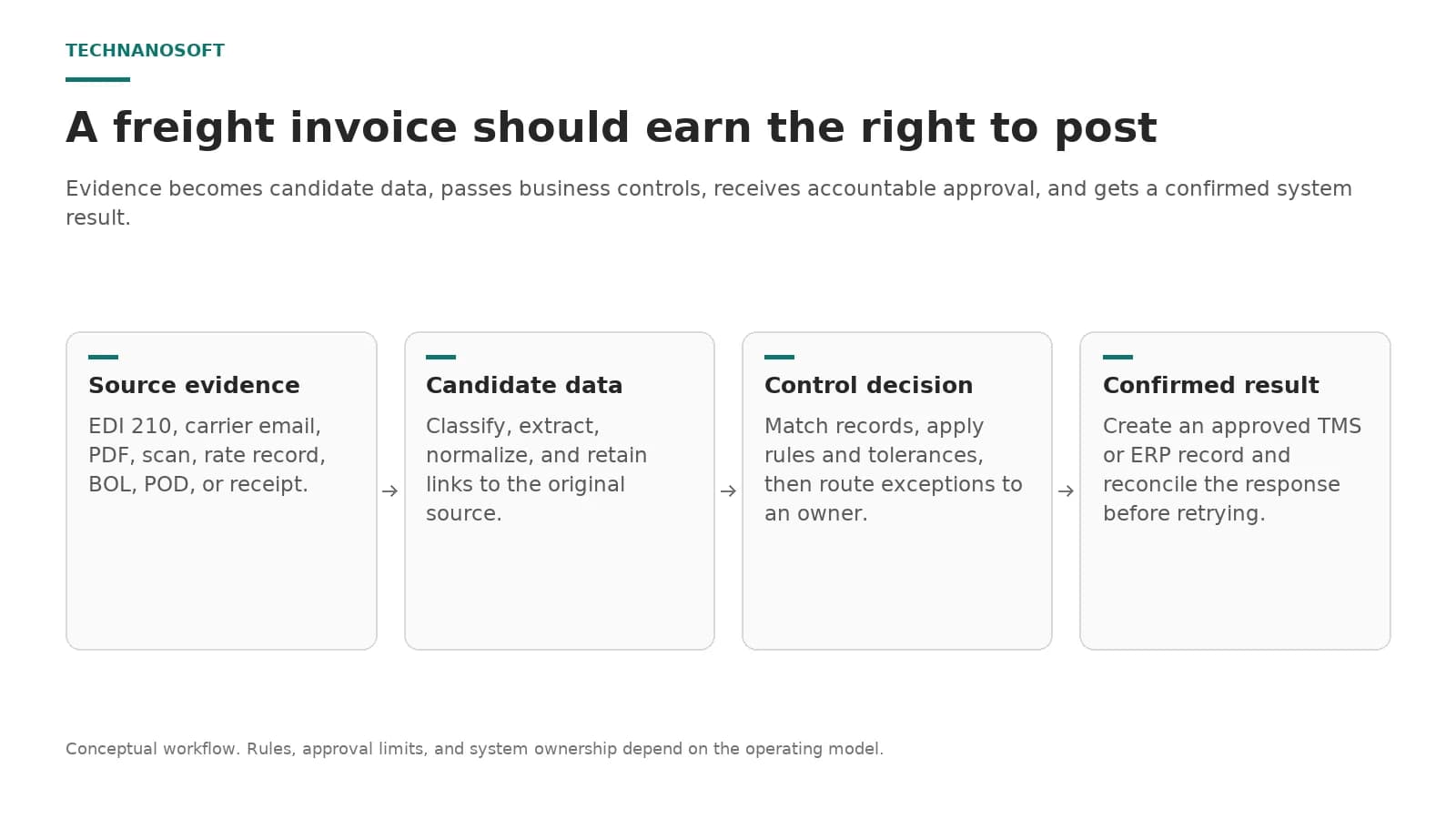
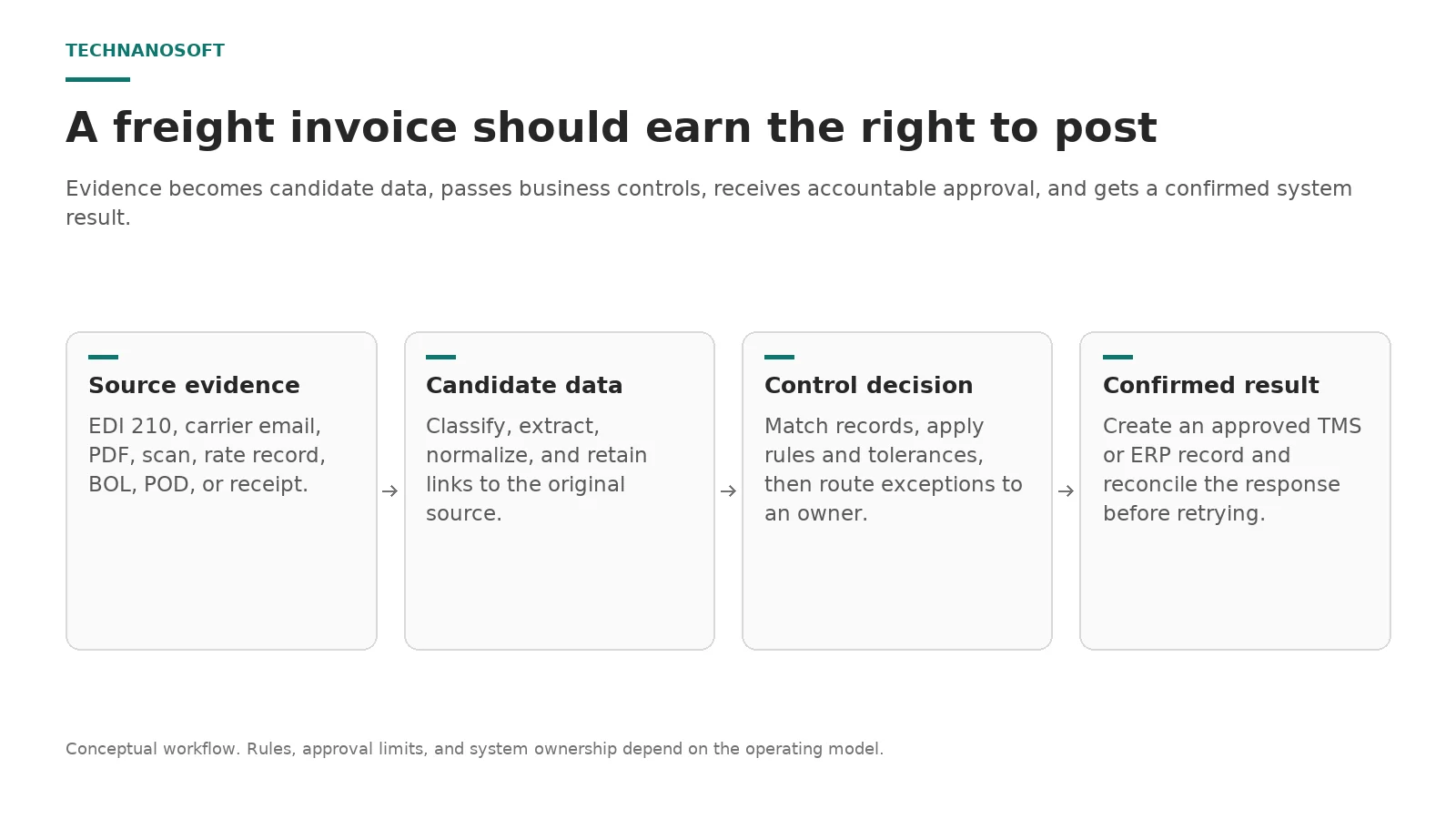
Freight invoice automation should do more than read carrier bills. A reliable workflow preserves the source evidence, prepares structured data, checks charges against trusted shipment and rate records, sends exceptions to accountable people, and confirms the final TMS or ERP action.
Estimated reading time: 16 minutes
Quick answer
Freight invoice automation combines intake, field extraction, shipment and rate matching, duplicate checks, exception routing, approvals, and TMS or ERP integration. AI can help classify varied documents and extract fields, but explicit business rules should control calculations, tolerances, permissions, and posting conditions. Start with one invoice path and measure its exception patterns. Buy or configure a maintained product when it fits; extend or build only the missing layer.
Key takeaways
| Buyer question | Practical answer |
|---|---|
| What should be automated first? | Intake, field preparation, record lookup, repeatable checks, and exception routing |
| Where does AI help? | Variable layouts, classification, extraction, and evidence preparation |
| What should remain deterministic? | Duplicate policy, rate logic, tolerances, permissions, and posting conditions |
| What still needs a person? | Ambiguous matches, unsupported charges, policy exceptions, and financial approval |
| What is the safest first release? | A bounded workflow that creates reviewable drafts before it enables automatic posting |
On this page
- Who this guide is for
- What freight invoice automation should include
- How the workflow works
- The Invoice Control Contract
- Architecture and failure handling
- How to estimate value
- Choose it when / avoid it when
- Pilot plan and provider criteria
- How Technanosoft approaches freight invoice automation
- Frequently asked questions
- The decision in one minute
Who this guide is for
This guide is for logistics operations, freight-audit, finance, and technology leaders whose carrier invoices move through email, EDI, portals, spreadsheets, a transportation management system (TMS), and an enterprise resource planning (ERP) or accounts-payable system. It is most useful when the team already knows manual rekeying is a problem but needs to decide what to automate, what to keep under human control, and whether to buy, configure, extend, or build.
What freight invoice automation should include
Freight invoice automation is the controlled movement of a carrier bill from arrival through preparation, commercial validation, exception resolution, approval, and confirmed posting. It may receive structured data or documents. X12 defines Transaction Set 210 for motor-carrier freight details and invoice information in an EDI environment, while real operations may also receive PDFs, scans, spreadsheets, portal downloads, or API payloads (X12 210; CIFFA workflow report).
That distinction matters. Structured EDI may need mapping and business validation but no optical character recognition (OCR). A scanned bill may need image cleanup and extraction before the same checks can run. In either case, the invoice is only a claim. The workflow still has to connect it to a shipment, agreed rate, supporting documents, vendor record, approval policy, and prior invoices.
| Current problem | Business consequence | Appropriate response |
|---|---|---|
| Invoices arrive through several channels | Work is missed, duplicated, or hard to prioritize | Controlled intake with source and status tracking |
| Staff rekey the same fields | Review time is spent on transcription | Structured mapping or document extraction |
| Charges are checked from memory or spreadsheets | Rules vary by reviewer and are hard to audit | Versioned rate, tolerance, and duplicate rules |
| Exceptions move through inboxes | Ownership and aging are unclear | Reason-coded queue with an owner and escalation path |
| System writes fail or time out | Teams may create duplicates on retry | Idempotent requests, response capture, and reconciliation |
How the workflow works
The core search-intent answer is a seven-stage flow. Each stage should have an input, an output, a failure state, and an accountable owner.
1. Capture and identify the source
Receive EDI messages, email attachments, uploads, portal exports, or API data through approved channels. Assign a stable intake ID, retain the original file or message, record the carrier and channel, and scan files according to the organization's security policy. Do not treat an email subject line or filename as a trusted invoice identifier.
2. Classify and prepare the invoice
Identify the document type, split combined packets where necessary, and map structured inputs to a common schema. For PDFs and scans, OCR or intelligent document processing can return candidate fields, line items, page locations, and confidence values. Amazon Textract is one official example of an API that returns invoice/receipt fields, line items, source geometry, and confidence information (AWS documentation). That capability prepares evidence; it does not approve the invoice.
3. Normalize without hiding the source
Standardize dates, currencies, identifiers, units, and charge codes, while preserving the original text and its location. A carrier's “DET,” “Detention,” and internal accessorial code may map to one business category, but the audit record should show both the source value and the normalized value. Reject impossible formats; route ambiguous conversions for review.
4. Match the invoice to trusted records
Use a documented hierarchy: an exact shipment or load identifier first, then carrier, bill of lading, service dates, lane, equipment, and amount as supporting evidence. Exact relationships should outrank fuzzy similarity. If two shipments remain plausible, the correct automation outcome is “unresolved,” not a forced best guess.
5. Apply commercial and control rules
Check duplicates, base rate, fuel logic, accessorial evidence, quantity or weight, taxes where applicable, currency, tolerance, vendor status, and approval limits. Use deterministic calculations when the policy is explicit. AI may summarize supporting text or prepare a reviewer packet, but it should not silently invent a missing rate, receipt, or authorization.
6. Route, decide, and record exceptions
Every exception needs a reason, severity, owner, evidence packet, allowed actions, and escalation clock. Operations may resolve a shipment mismatch; carrier management may assess a disputed accessorial; finance may own coding or approval limits. Record corrections and overrides separately so teams can see whether a recurring issue comes from documents, master data, carrier behavior, rules, or integrations.
7. Post and reconcile the destination result
Create a draft or approved record in the TMS, ERP, or AP system only when the control policy allows it. Send an idempotency key so the same logical invoice cannot be created twice by a retry. Store the destination ID and response. If the request times out, reconcile the destination before resending; “no response” does not mean “not created.”
Review your integration requirements: If the document preparation works but matching, exception ownership, or system handoffs remain fragmented, discuss the workflow with Technanosoft.
The Invoice Control Contract
Before selecting software, write a one-page contract for how an invoice earns the right to move. This is an editorial planning framework, not a claimed proprietary or certified methodology.
| Layer | Decision to document | Minimum evidence |
|---|---|---|
| Workflow | Where does the invoice enter, pause, branch, and finish? | Current-state map, channels, volumes, status definitions |
| Users | Who reviews, corrects, approves, overrides, and supports it? | Roles, approval limits, segregation of duties |
| Data | Which values and documents are authoritative? | Field dictionary, source hierarchy, retention rules |
| Integrations | Which systems read or write each record? | API/EDI capabilities, credentials, rate limits, error behavior |
| Intelligence | Where does extraction or classification help? | Representative test set, field-level evaluation, thresholds |
| Controls | What blocks, escalates, retries, and gets audited? | Rules, tolerances, exception reasons, idempotency, logs |
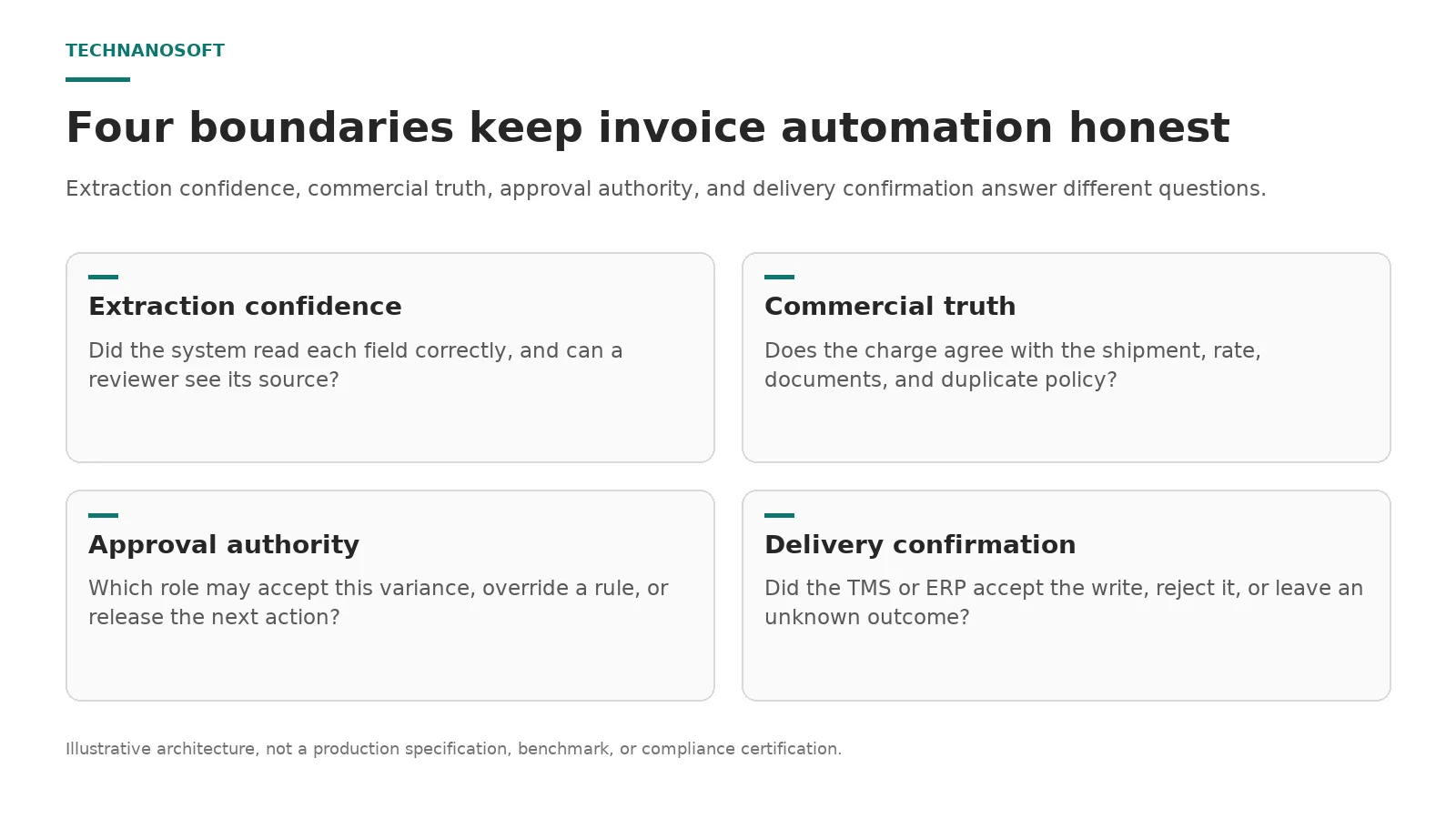
The important design choice is not “AI or no AI.” It is which layer owns each decision. A document model may report high confidence for a total that was printed clearly; the charge can still violate the rate agreement. A business rule can find a variance; only an authorized person may be allowed to accept it. An approved record can still fail to reach the ERP. Treat these as separate facts.
Architecture and failure handling
| Boundary | Question | Typical failure | Safe response |
|---|---|---|---|
| Extraction confidence | Did the system read the field correctly? | Poor scan, changed layout, merged rows | Show source evidence; correct or reprocess |
| Commercial truth | Does the value agree with trusted records? | Missing shipment, rate variance, unsupported fee | Block or route with the failed rule |
| Approval authority | May this person or system accept the case? | Limit exceeded, wrong role, missing second approval | Escalate; never broaden permissions silently |
| Delivery confirmation | Did the destination accept the write? | Validation error, rate limit, timeout, partial outage | Record response; reconcile before retry |
Confidence thresholds should be tested per critical field, not selected from a generic accuracy claim. Google Cloud's Document AI documentation notes that a higher threshold generally produces higher precision and lower recall—fewer predictions pass, so more items may need review (Google Cloud documentation). The right threshold therefore depends on the cost of a false acceptance, the cost of review, document quality, and the rule that follows extraction.
Common controls include least-privilege credentials, encrypted transport and storage, versioned rules, source-level audit evidence, protected overrides, separation between audit and payment, queue-aging alerts, and monitoring for carrier-template drift. NIST describes its AI Risk Management Framework as voluntary guidance for incorporating trustworthiness considerations into the design, use, and evaluation of AI systems; it is useful as a risk lens, not as a freight-specific certification (NIST AI RMF).
Exception ownership matrix
| Exception | Default state | Owner | Evidence to retain |
|---|---|---|---|
| Missing or conflicting shipment | Blocked | Transportation operations | Original invoice, candidate records, resolution |
| Suspected duplicate | Held | AP or freight audit | Duplicate key, related invoice, final decision |
| Unsupported accessorial | Review | Carrier management or operations | Rate terms, POD/receipt, reviewer note |
| Low-confidence critical field | Review | Invoice-review team | Source crop, candidate value, correction |
| Approval limit exceeded | Escalated | Authorized approver | Policy version, approval chain, timestamps |
| Unknown destination response | Reconciliation | Integration support | Idempotency key, request ID, lookup result |
How to estimate value
Avoid a universal cost, savings, or timeline claim. Start with observed inputs from the workflow being considered.
Monthly gross handling hours = invoice volume × current minutes per invoice ÷ 60
Potential hours released = volume × eligible automation share × minutes avoided per eligible invoice ÷ 60
New monthly operating effort = exception volume × review minutes ÷ 60 + monitoring + support + rule maintenance
Net operating value = value of usable time released + avoided error/rework cost − recurring software/model cost − ongoing support cost
Then compare the net operating value with one-time discovery, configuration or development, integration, testing, training, and change-management cost. Keep cash savings, risk reduction, faster close, and staff capacity as separate categories. Time released is not automatically reduced payroll, and a flagged charge is not automatically a recovered dollar.
Measure at least: invoices received, invoices eligible for the chosen path, field-level correction rate, match rate, exception rate by reason, review time, queue age, duplicate blocks, posting failures, and reconciliation outcomes. These observed values make a later estimate more credible than a vendor-wide average.
Choose it when / avoid it when
| Option | Choose it when | Avoid it when |
|---|---|---|
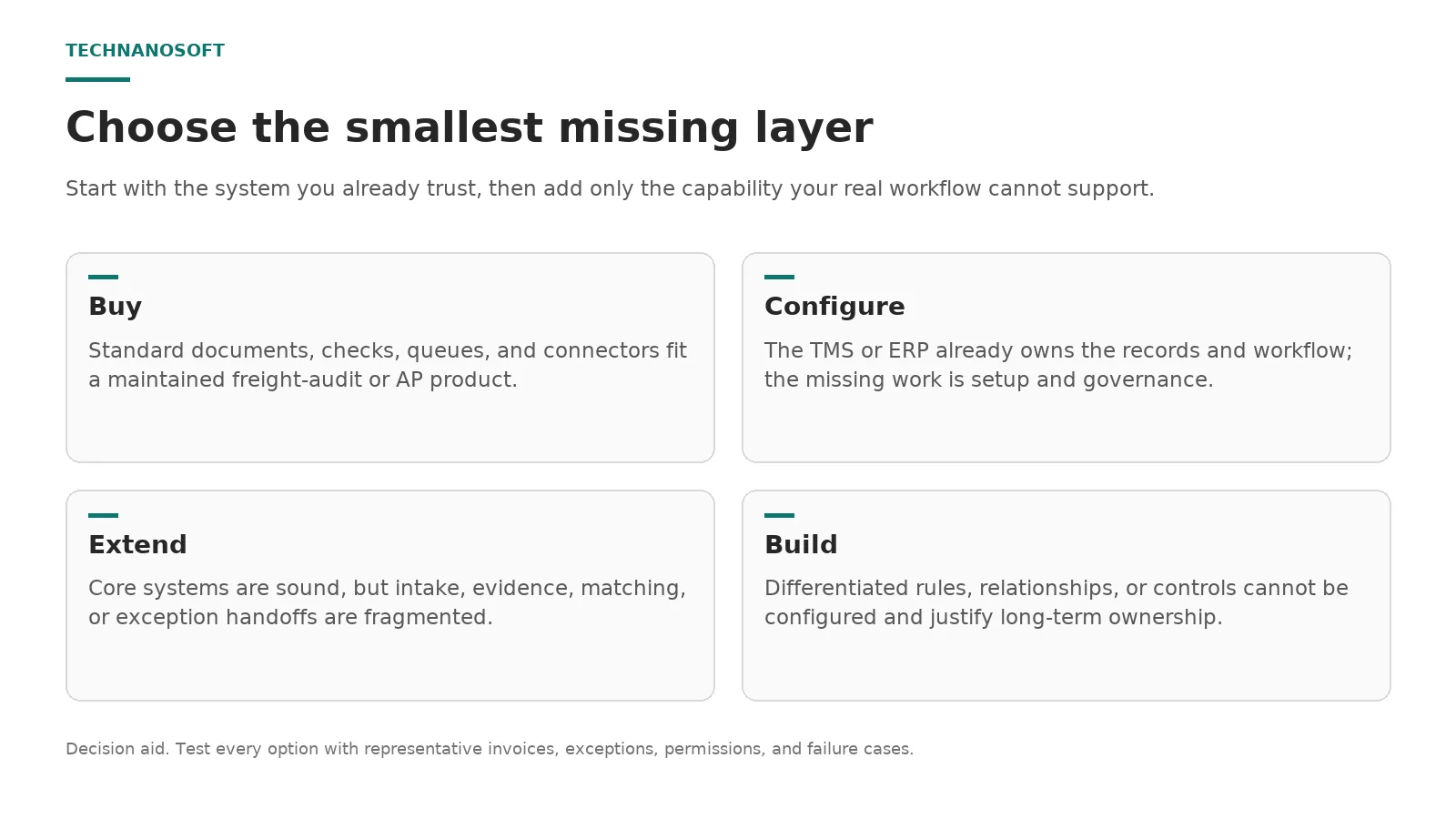
| Buy a freight-audit or AP product | Standard formats, checks, queues, and connectors cover the workflow | Critical rules, evidence, or integrations cannot be represented safely |
| Configure the TMS or ERP | It already owns shipments, rates, invoices, approvals, and adequate document handling | The work crosses systems or needs capabilities the core platform does not offer |
| Extend with an integration/review layer | Core systems are reliable, but intake, matching, evidence, or exceptions are fragmented | A maintained connector or module already fits with lower ownership cost |
| Build custom workflow software | Differentiated rules, relationships, or controls cannot be configured and justify long-term ownership | Requirements are standard, temporary, unmeasured, or lack an operational owner |
Choose automation when the workflow repeats, sources of truth are identifiable, rules can be stated, exceptions have owners, and the organization can operate the result. Avoid automatic posting when master data is unreliable, rate logic is unresolved, approvals are informal, documents cannot be retained appropriately, or downstream failure cannot be reconciled. In those cases, improve the process or create a review workspace first.
Pilot plan and provider criteria
A controlled pilot should prove the workflow on difficult cases before it expands.
- Select one invoice channel, one destination system, a representative carrier group, and named reviewers.
- Build a labeled test set covering clean invoices, poor scans, multi-page packets, credits, rebills, duplicate numbers, missing shipment IDs, rate changes, accessorials, and destination outages.
- Establish a baseline for handling time, correction rate, match outcomes, exception reasons, and queue age.
- Run in shadow mode: prepare recommendations without allowing automatic financial action.
- Review false acceptances and unresolved cases by field and rule, not only an average score.
- Enable limited automation only for a documented low-risk path, with a rollback and stop condition.
Ask a provider to demonstrate source evidence for extracted fields, separate extraction confidence from business checks, explain its matching hierarchy, show permissions and audit logs, and walk through timeouts and partial failures. Confirm who owns configuration, prompts, rules, corrected data, and integrations. Require export paths and a test environment. A provider should also be willing to recommend a standard product or configuration when custom development would add unnecessary risk.
Technical perspective
The most valuable architecture decision is usually not the model. It is the control boundary: which system owns commercial truth, who may accept an exception, and how an uncertain write is reconciled. Use AI where inputs vary. Use rules where policy is explicit. Keep payment authority with the role and system designed to hold it.
How Technanosoft approaches freight invoice automation
Technanosoft's verified AI Workflow Automation service describes document extraction, validation, exception handling, approval checkpoints, audit trails, confidence rules, and connected system actions. Its logistics and field operations page also covers role-based controls, operational exceptions, reporting, and cloud-ready APIs. These pages support the service fit; they are not a claim that Technanosoft has delivered the illustrative freight workflow or achieved a particular result.
For this type of project, a sensible discovery starts with one real invoice path. Map the documents, people, systems, rules, approval limits, exception reasons, and failure states. Decide whether the right answer is configuration, a connector, a review layer, or a custom workflow. Then prototype with representative documents and real destination constraints.
The first release should preserve source evidence, explain why an invoice moved or stopped, restrict system permissions, and produce a reviewable destination record. Testing should include normal invoices, ambiguous matches, unsupported charges, duplicate scenarios, role violations, rate limits, timeouts, and safe retry behavior. AI is optional: structured EDI and stable templates may need conventional mapping and rules rather than a model.
Expansion should depend on observed results, not a predetermined AI roadmap. Review correction patterns, exception volume, queue age, system reliability, and reviewer decisions. Automate only the paths that have earned it.
Frequently asked questions
Does freight invoice automation require AI?
No. EDI, APIs, stable templates, and explicit business rules can often be handled with conventional software. AI or intelligent document processing is useful for variable documents, classification, and field extraction. It should not replace deterministic rate calculations, duplicate policy, approval rules, or reconciliation logic.
What records should an invoice be checked against?
The exact set depends on the operation, but common sources include the shipment or load record, rate confirmation or tariff, bill of lading, proof of delivery, accessorial receipts, fuel schedule, carrier master, prior invoices, currency data, and approval policy. Define which source wins when records conflict.
Is extraction confidence the same as invoice accuracy?
No. Confidence estimates whether a field was read correctly. Business validation asks whether the value is allowed and supported. A clearly printed but unauthorized fee can have high extraction confidence and still fail the audit.
Can a system auto-post matched invoices?
Only after the organization approves the eligibility rules, authorization boundary, tolerance, and failure-recovery process. A safer first release often creates a TMS, ERP, or AP draft. Unusual amounts, unsupported charges, low-confidence critical fields, and policy exceptions should remain reviewable.
How should duplicate detection work?
Use more than an invoice number. Consider carrier, shipment, date, amount, document hash, credit/rebill relationships, and prior status. Treat a suspected duplicate as an explainable hold, not an automatic deletion or rejection.
What should happen when an ERP request times out?
Preserve the request and its idempotency key, then check whether the destination created the record. Retry only when the outcome is known or the destination contract makes the retry safe. Blind replay can create duplicate liabilities.
How long does implementation take and what does it cost?
A defensible estimate requires actual invoice formats, volume, rule complexity, source-system access, integration interfaces, security requirements, test data, and exception ownership. Ask the delivery team to estimate a bounded pilot and separate one-time implementation from recurring software, model, support, and maintenance costs.
The decision in one minute
Freight invoice automation is a control and integration problem with document technology inside it. Map one invoice from source evidence to confirmed system result. Separate extraction confidence, commercial truth, approval authority, and delivery confirmation. Give every exception a reason, owner, and next action. Measure the current workflow before estimating value.
Buy or configure a maintained product when it fits. Extend a sound TMS or ERP when the gap is a handoff. Build only when a material workflow or control cannot be configured and the organization is prepared to own it. Begin in shadow mode, test difficult cases, and let observed performance determine what is safe to automate next.
Have a freight invoice workflow to improve? Discuss the current process, controls, and practical first release with Technanosoft.