Technanosoft Insights
Dock Scheduling Software: Build, Buy, or Extend?
A controls-first guide to dock appointment scheduling, capacity rules, exception handling, system integrations, total-cost logic, and the decision to buy, configure, extend, or build.

A controls-first guide to dock appointment scheduling, capacity rules, exception handling, system integrations, total-cost logic, and the decision to buy, configure, extend, or build.
Dock scheduling software should give carriers a valid way to request time, apply the facility's real capacity rules, keep one trusted appointment record, and route conflicts to a named owner. Most warehouses should test a suitable product first; configure, extend, or build only when the operational gap is specific and valuable enough to justify the extra ownership.
Approximate reading time: 16 minutes.

Quick answer
Buy dock scheduling software when standard carrier booking, capacity, notifications, and reporting cover the workflow. Configure it when the product fits but the facility needs its own load types, cutoffs, door rules, and permissions. Extend it when scheduling works but data must move reliably among a TMS, WMS, ERP, yard system, or reporting layer. Build custom software only when the scheduling model or network workflow is genuinely differentiating and your team can own security, support, adoption, and change.
Key takeaways
| Decision point | Practical answer |
|---|---|
| Best default | Test a standard product against representative appointments and exceptions before commissioning a build. |
| Core control | Availability must come from explicit capacity and operating rules, not a shared calendar alone. |
| Common hidden scope | Carrier access, rescheduling, integration failures, permissions, audit history, and exception ownership. |
| AI's useful role | Extract or classify unstructured requests; keep capacity, permissions, and approvals rules-based. |
| First planning step | Map one facility's appointment lifecycle and identify the system of record for each state change. |
On this page
- Who this guide is for
- What dock scheduling software should control
- Buy, configure, extend, or build
- The Dock Scheduling Control Map
- Workflow and architecture
- Cost and value model
- Use cases and system boundaries
- Choose it when / avoid it when
- Risks and failure handling
- Provider selection
- How Technanosoft approaches dock scheduling software
- Frequently asked questions
- The decision in one minute
Who this guide is for
This guide is for an operations leader, warehouse manager, product owner, CIO, or CTO who has already identified appointment coordination as a problem and now needs to decide what kind of system intervention is proportionate. It is especially relevant when carriers still book by phone or email, several people edit the same schedule, capacity rules live in employees' heads, or appointment status is disconnected from transportation and warehouse systems.
It is not a vendor ranking. It does not assume that custom development is better than SaaS, or that adding AI will repair unclear operating rules.
What dock scheduling software should control
Dock scheduling software manages the appointment before a vehicle reaches a loading point: who may request a slot, which times and doors are valid, what information is required, how changes are approved, and where the confirmed booking is recorded. SAP's documentation describes planning loading and unloading arrivals, balancing loading-point workload, carrier collaboration, and standalone or EWM-integrated deployment. That is useful evidence of the category's scope, though it describes SAP's product rather than every implementation. SAP Dock Appointment Scheduling
A practical system usually needs to control five things:
- Eligibility: which carrier, supplier, shipment, purchase order, load type, or facility may request an appointment.
- Capacity: which doors, equipment, labor windows, service times, and operating constraints make a slot valid.
- State: whether a request is proposed, confirmed, changed, canceled, checked in, in service, or complete.
- Coordination: who is notified and which TMS, WMS, ERP, yard, reporting, or messaging system receives the update.
- Exceptions: who resolves missing references, conflicts, late changes, no-shows, unavailable systems, and operational overrides.
A shared calendar may display time, but it rarely enforces all five controls. Conversely, a full yard management system may be excessive when the real problem ends at appointment confirmation.
Buy, configure, extend, or build
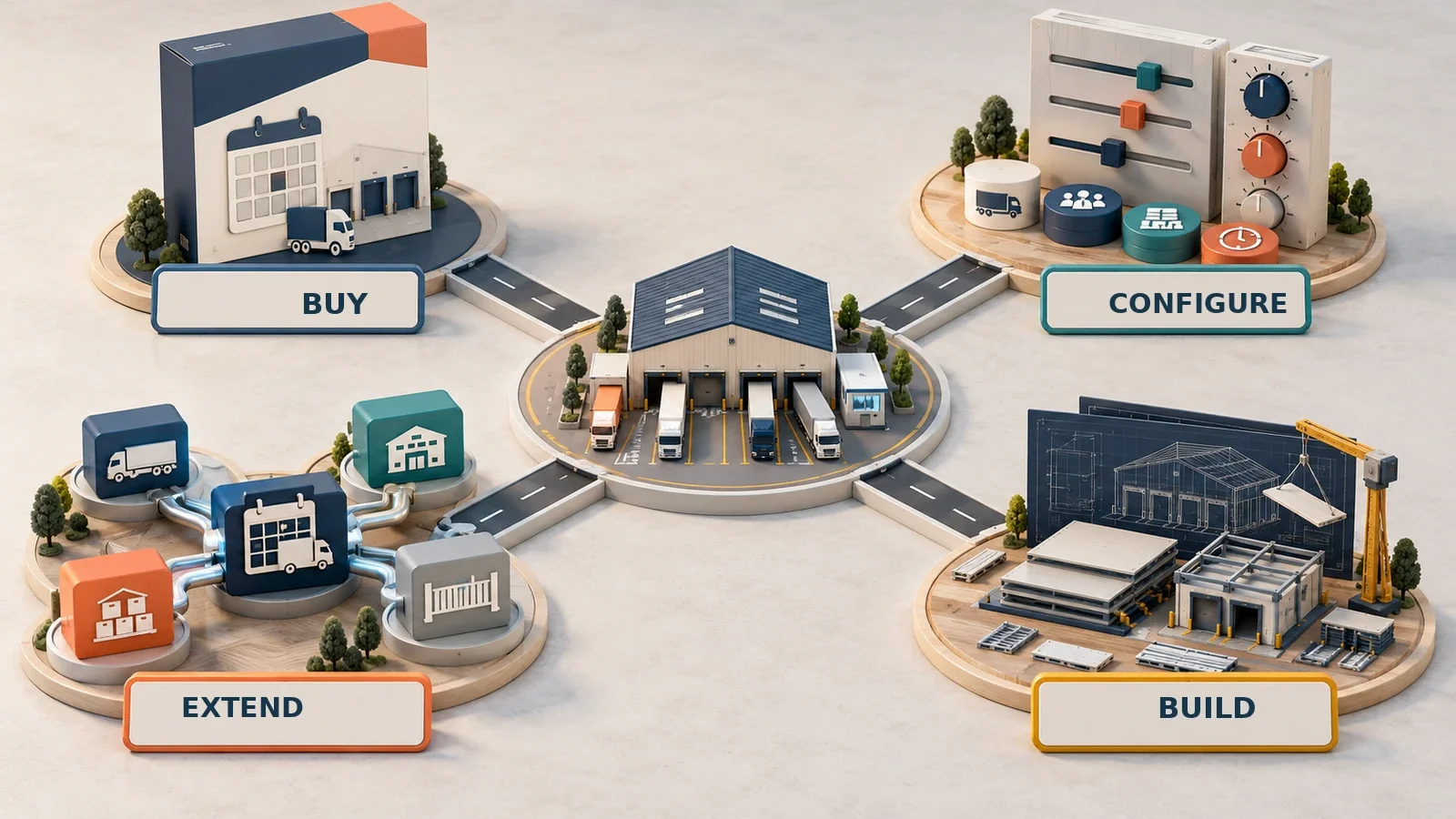
The main decision is not simply “SaaS or custom.” There are four useful interventions, and the smallest one that closes the material gap is usually the safest place to start.
| Route | Choose it when | Main trade-off | Proof to request |
|---|---|---|---|
| Buy | A standard carrier portal, slot rules, notifications, and reports fit the operation with limited change. | The warehouse adapts some processes to the product. | A live walkthrough using representative bookings, reschedules, conflicts, and no-shows. |
| Configure | The product is suitable, but each facility needs different doors, load types, cutoffs, permissions, or approval rules. | Configuration can become difficult to govern when every site asks for a unique variant. | Versioning, test environments, change logs, and a repeatable site template. |
| Extend | Core scheduling works, but data must move to existing systems, a custom carrier experience, or a specialized reporting/control layer. | Integrations introduce monitoring, retry, mapping, and ownership work. | API limits, event behavior, error handling, security model, and support boundaries. |
| Build | The scheduling logic is genuinely unusual, commercially differentiating, or inseparable from a proprietary operating platform. | You own product design, security, availability, adoption, maintenance, and every edge case. | A narrow first-release scope, architecture, operating model, and full-lifecycle cost. |
A fast verdict
Start with buy if the operation can adopt standard booking and capacity behavior. Move to configure when fit depends on facility-specific rules. Choose extend when the product is acceptable but the handoffs are not. Consider build only when the unique workflow creates lasting value that cannot be achieved through a supported product and integration layer.
The strongest reason to build is not “our process is special.” It is that a clearly documented difference matters enough to fund ongoing ownership.
The Dock Scheduling Control Map
Before comparing screens, map the operating model. The following six-layer planning lens is editorial analysis for this guide, not a claimed proprietary or proven methodology.
| Layer | Question to answer | Typical evidence |
|---|---|---|
| Capacity | What makes a time and door truly available? | Door calendars, load types, service durations, labor or equipment constraints, blackout windows. |
| Participation | Who requests, approves, changes, and consumes an appointment? | Carrier, supplier, broker, gate, warehouse, transportation, and site-admin roles. |
| Data | Which identifiers and documents are required before a request can progress? | Shipment, purchase order, facility, stop, commodity, trailer, reference, and attachment rules. |
| Integration | Which system owns each fact and which systems need the result? | TMS, WMS, ERP, YMS, identity, messaging, analytics, and master-data boundaries. |
| Decision | Which outcomes are deterministic, which need approval, and which may be assisted? | Validation rules, override policy, escalation path, and optional extraction/classification. |
| Control | How will changes, failures, and access be reviewed? | Audit history, role permissions, idempotency, retries, alerts, retention, and support ownership. |
If a provider cannot walk through these layers using one real appointment scenario, its feature list is not yet evidence of fit.
Workflow and architecture
A reliable workflow keeps the booking state separate from the messages and system calls around it. Shipwell's official documentation provides a concrete product example: availability is retrieved for a facility, an appointment is created for a dock and shipment, and later actions can include rescheduling, cancellation, check-in, start, check-out, and end. The exact endpoints are product-specific, but the state transitions are useful planning evidence. Shipwell dock scheduling documentation
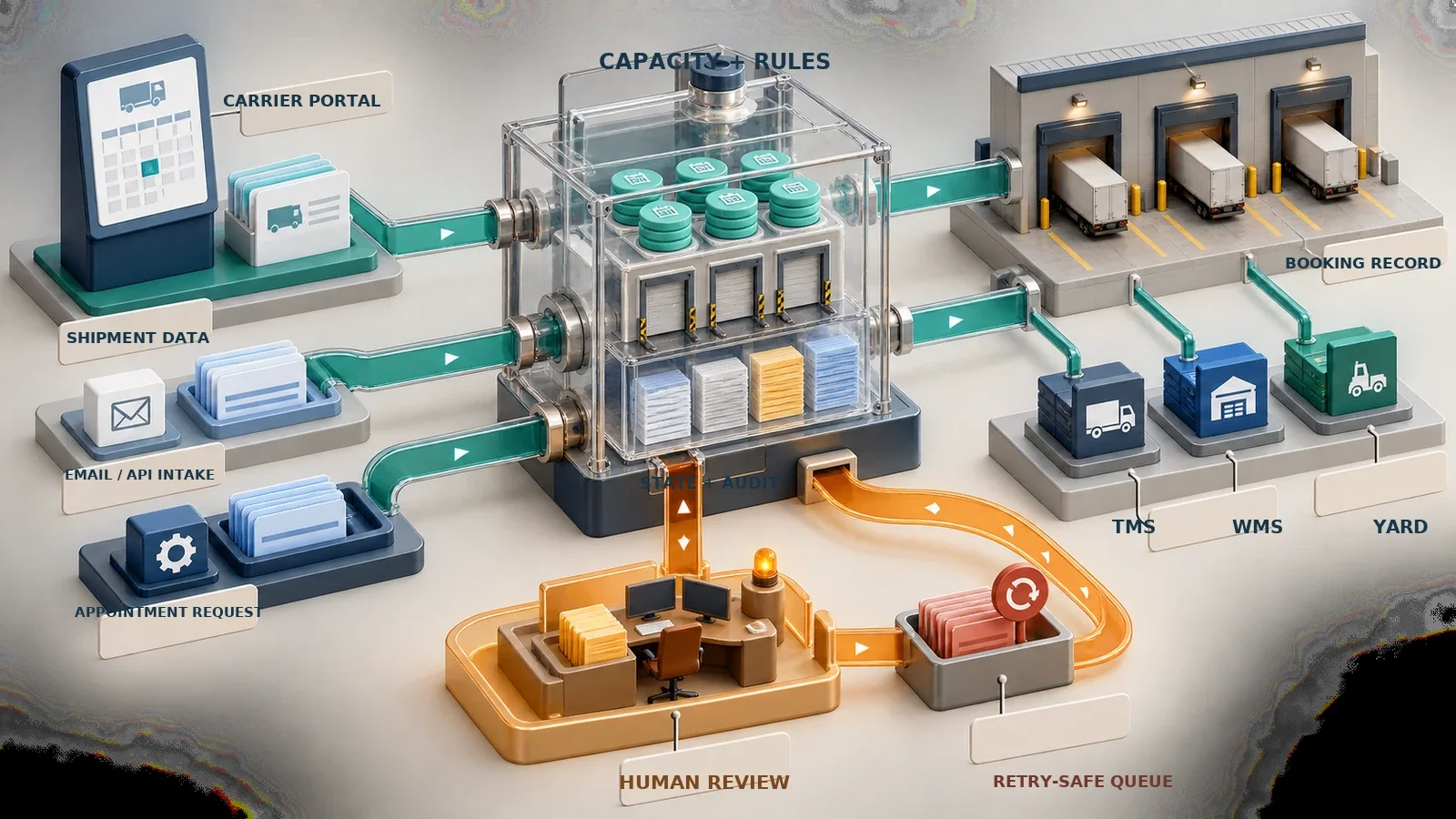
A controlled appointment flow
- Receive the request. A carrier uses a portal, or a request arrives through an API, structured file, or controlled email-intake process.
- Resolve the references. Match the facility, shipment or purchase order, stop, carrier, and load type. A missing or ambiguous identifier stops automatic progress.
- Calculate valid availability. Apply door eligibility, duration, capacity, operating hours, buffers, cutoffs, and other explicit rules.
- Create or change one booking record. Store a unique request key so a repeated message does not create a second appointment.
- Publish the state change. Send the confirmed or revised appointment to the systems and people that need it.
- Confirm delivery. Record whether each downstream update succeeded. Retry safe technical failures; route business conflicts to a person.
- Preserve the history. Keep who requested, approved, changed, or overrode the appointment and why.
Source-of-truth decisions
The scheduling layer does not have to own every fact. It does need an explicit authority for each one. The TMS may own the shipment and stop; the WMS may own workload or receiving context; the yard system may own arrival and on-site movement; the scheduling system may own the appointment. Write these boundaries down before integration work begins.
Two dangerous designs are common. In the first, several systems can change the appointment without a clear precedence rule. In the second, a successful booking is assumed to have reached every downstream system even when one call failed. Both produce silent operational disagreement.
Where AI may help—and where rules should lead
AI may help extract a requested date, facility, reference, or load description from an unstructured email or document. It may classify a reason for change or prepare an exception summary. Those are assistive tasks.
Door eligibility, capacity arithmetic, required fields, duplicate protection, permissions, cutoffs, and final overrides should remain explicit and testable. If the input is ambiguous or confidence is insufficient, the system should prepare the context and ask a person rather than invent a booking.
Cost and value model
Published license prices rarely answer the whole decision because each route moves cost into a different category. Use a total-cost model with named inputs rather than a generic range.
Three-year total cost of ownership = subscription or build cost + implementation + integrations + carrier/site onboarding + identity and security work + data migration + support + infrastructure + change management + expected enhancement work.
| Cost component | Buy/configure | Extend | Build |
|---|---|---|---|
| Product/license | Usually recurring | Recurring product plus extension costs | Replaced by product engineering and infrastructure |
| Implementation | Facility rules, roles, templates, training | All product setup plus integration delivery | Discovery, design, development, QA, release, and adoption |
| Integration | Standard connectors or vendor services | Major cost and operating responsibility | Native part of the product but still costly to maintain |
| Change | Bound by vendor configuration and roadmap | Split between vendor and extension team | Fully owned by the product team |
| Support risk | Vendor dependency | Shared boundary can complicate incidents | Internal or contracted team owns the entire service |
Model potential benefit separately:
Potential coordination hours released per month = monthly appointment actions × average manual minutes per action × eligible automation share ÷ 60.
Then subtract review time, carrier support, exception handling, software cost, maintenance, and implementation amortization. Time released is not automatically cash savings or reduced headcount. It may instead become faster response, more consistent records, or capacity for other work.
For a credible business case, capture a baseline from your own operation: booking touches, reschedules, conflict rate, no-shows, manual follow-ups, dwell by relevant segment, and the number of appointments that bypass the intended process. Do not insert a market average where the local workflow can be measured.
Use cases and system boundaries
Inbound receiving
Suppliers or carriers request appointments against purchase orders or inbound loads. The scheduling layer validates references and capacity, while the WMS or ERP remains authoritative for the order or receipt. This is a good fit for standard software when rules are stable and suppliers can use a common portal.
Outbound pickup
Appointments depend on load readiness, carrier assignment, and shipping cutoffs. Integration becomes more important because a time should not remain bookable when the underlying load is not ready or the carrier changes.
Manufacturing and constrained equipment
Certain doors may support only particular commodities, equipment, handling methods, or service durations. Configuration may be sufficient when these rules can be expressed cleanly; a build becomes more plausible when scheduling is inseparable from proprietary production sequencing.
Multi-site 3PL operations
A shared product can standardize access and reporting, but site rules still need controlled variation. The design should distinguish reusable policy from one-off exceptions so each facility does not become its own software branch.
Dock scheduling versus adjacent systems
| System | Primary job | When it is not enough |
|---|---|---|
| Dock scheduling | Request, validate, confirm, change, and report loading appointments. | When the problem is trailer location, gate movement, or yard tasks after arrival. |
| Yard management system | Coordinate gate, trailer position, yard moves, and door assignment on site. | When external participants still lack a usable pre-arrival booking process. |
| TMS | Plan and execute transportation, loads, carriers, stops, and related workflows. | When its appointment function cannot express facility capacity or external access needs. |
| WMS | Run warehouse inventory, receiving, picking, and shipping work. | When it does not provide the collaboration and slot-control layer required before arrival. |
SAP documents both standalone and EWM-integrated dock scheduling, which reinforces a practical point: the right boundary depends on the operating environment rather than a universal rule. SAP deployment options
Choose it when / avoid it when
Choose a dock scheduling initiative when
- The business can describe a recurring appointment workflow and its exceptions.
- Door or resource capacity needs enforceable rules, not only a visible calendar.
- External carriers or suppliers need controlled access.
- Changes must reach warehouse, transportation, yard, or reporting systems reliably.
- A named operational owner will manage policies, adoption, and exceptions after launch.
Avoid or pause it when
- The main problem is yard movement or trailer visibility after arrival; evaluate a YMS boundary first.
- The appointment volume and rules are simple enough for an existing supported tool.
- Nobody owns capacity data, overrides, or carrier adoption.
- The team wants AI to decide around undefined rules.
- A custom build is being justified only by dislike of a current interface.
An existing TMS, WMS, ERP module, or focused scheduling SaaS may be the better choice. A lightweight automation may also solve a narrow notification handoff, provided the team accepts responsibility for monitoring and retries.
Risks and failure handling
| Failure mode | Operational consequence | Control to require |
|---|---|---|
| Duplicate request or replay | Two appointments consume the same capacity. | Stable request keys, idempotent create/change handling, and a visible duplicate result. |
| Stale capacity | A slot appears valid although labor, door, or load conditions changed. | Capacity ownership, refresh rules, transaction checks, and controlled overrides. |
| Missing shipment reference | Booking cannot be reconciled to transportation or warehouse work. | Required-field validation and a human resolution queue. |
| Downstream system unavailable | A confirmed appointment is absent from another operational system. | Retry-safe queue, delivery status, alerting, and reconciliation. |
| Uncontrolled reschedule | Carrier and facility operate from different times. | Versioned state, notifications, effective timestamps, and change history. |
| Over-broad access | External or internal users see or change unrelated appointments. | Role and facility boundaries, least-privilege permissions, and access review. |
| Portal bypass | Calls and email continue outside the intended process. | Adoption plan, fallback rules, assisted onboarding, and bypass reporting. |
An illustrative workflow
Consider a hypothetical regional distribution network receiving appointment requests through a portal and email. A carrier submits a purchase-order reference, trailer type, requested date, and service requirement. The system matches the reference, calculates valid doors and times, and proposes a slot. A same-day request outside the cutoff does not auto-book: it enters a supervisor queue with the relevant shipment and capacity context. When confirmed, the booking is posted to the WMS and transportation system. If the WMS is unavailable, the appointment remains confirmed but visibly “delivery pending” until a retry succeeds or an operator intervenes.
This is an illustrative design, not a Technanosoft client result. Its purpose is to show why business exceptions and technical failures should not share one generic error status.
Technical perspective: The calendar is the visible part of dock scheduling. The durable value comes from explicit capacity rules, one booking state, reliable system handoffs, and an exception owner. If those controls are unclear, a new interface only moves the ambiguity.
Have a dock appointment workflow that is difficult to fit into standard software? Review the workflow and integration requirements with Technanosoft after documenting one representative booking, reschedule, conflict, and system failure.
Provider selection
For product vendors, integrators, and custom development teams, ask for evidence against the same operating scenario.
| Evaluate | What to look for |
|---|---|
| Workflow fit | A demonstration using your facility, load types, roles, cutoffs, changes, and exceptions. |
| Architecture | Clear ownership of appointment state, master data, integrations, retries, and audit history. |
| External access | Practical carrier/supplier onboarding, identity options, facility boundaries, and support. |
| Delivery | A narrow first release, representative test data, pilot criteria, migration plan, and rollback path. |
| Security | Role design, access logging, secret handling, vulnerability process, and data-retention choices. |
| Reliability | Monitoring, alerting, recovery targets, retry behavior, and incident ownership. |
| Commercials | Total cost across product, integration, onboarding, support, change, and exit—not the headline fee alone. |
| Ownership | Data export, configuration ownership, custom code/IP terms, documentation, and transition support. |
Do not accept a generic “real-time integration” claim. Ask which event starts the update, which system is authoritative, how a duplicate is recognized, what happens on timeout, and where an operator sees the unresolved state.
How Technanosoft approaches dock scheduling software
Technanosoft's current custom-software page states that it builds booking systems, vendor portals, workflow systems, API-based platforms, role-based controls, and integrations after mapping people, data, approvals, and handoffs. Its logistics and field-operations page also describes scheduling, exception handling, operational dashboards, approvals, cloud-ready APIs, and integration work. These are first-party service claims, not independent evidence of a specific dock-scheduling implementation. Custom software development and logistics and field operations software
For a dock scheduling initiative, a responsible engagement should begin with the intervention decision. If a standard product fits, the useful work may be evaluation, configuration, integration, or a limited extension—not a replacement platform. If a custom build is justified, the first release should normally focus on one facility or representative operating model and include the complete control loop: participant access, capacity rules, booking state, changes, exceptions, downstream confirmation, and audit history.
Architecture should follow the systems already in place. The goal is to define which system owns shipment, facility, capacity, appointment, arrival, and warehouse execution facts; then connect only the required states. AI can be added where unstructured requests create measurable manual work, but not as a substitute for deterministic capacity and permission rules.
A useful discovery output is a workflow map, decision record, integration boundary, risk list, first-release scope, and cost model that the buyer can assess before authorizing development.
Frequently asked questions
What is dock scheduling software?
Dock scheduling software controls loading and unloading appointments before arrival. It gives authorized participants a way to request or change time, applies facility capacity and eligibility rules, records the booking state, notifies relevant users, and exchanges the result with operational systems where needed.
Is dock scheduling the same as yard management?
No. Dock scheduling primarily controls pre-arrival appointments and capacity. Yard management primarily coordinates what happens after arrival, including gate processing, trailer location, yard moves, and physical door activity. Products may combine both, but buyers should confirm the scope they actually need.
Should we build custom dock scheduling software?
Usually, test standard products first. Build when the scheduling logic is materially unique, valuable, and difficult to express through configuration or a supported extension—and only when the organization can own security, availability, support, carrier adoption, and ongoing product change.
Which integrations matter most?
That depends on system ownership. Common boundaries include a TMS for shipments and stops, a WMS or ERP for receiving/shipping context, a YMS for arrival and yard movement, identity for participant access, messaging for confirmations, and analytics for operational review. Connect only the states each consumer needs.
Can AI automate dock appointments?
AI can assist with unstructured email or document intake, classify change reasons, or summarize an exception. Capacity calculations, eligibility, duplicate protection, permissions, and overrides should remain explicit and testable. Ambiguous requests should go to human review.
How should we estimate value?
Measure the current workflow. Count appointment actions, manual minutes, reschedules, follow-ups, bypasses, and exception handling. Estimate only the eligible share, subtract review and operating costs, and treat time released separately from cash savings. Also track data consistency and unresolved handoffs.
What should a pilot prove?
A pilot should prove one representative flow end to end: request, validation, capacity, confirmation, reschedule, cancellation, conflict, downstream update, timeout/retry, audit history, and participant adoption. Define acceptance criteria before the pilot starts.
The decision in one minute
| If your situation is… | Consider… |
|---|---|
| Standard booking and capacity rules | Buy a focused product or use a supported module you already own. |
| Standard product with facility-specific policies | Configure it with governed templates and change control. |
| Good scheduling product but broken handoffs | Extend it with a monitored integration or workflow layer. |
| Proprietary scheduling logic tied to a differentiated platform | Scope a custom build, starting with one complete control loop. |
| Mostly yard movement after arrival | Revisit the YMS boundary before buying dock scheduling alone. |
| Unclear rules and no process owner | Pause software selection and map the operation first. |
The right dock scheduling software is the one that makes valid capacity bookable, keeps one trusted appointment state, and gives every exception an owner. Start with the smallest intervention that can prove that loop. If standard software fits, use it. If the gap is integration, extend it. If the operating model is truly unique and durable, build deliberately.
Discuss your dock scheduling workflow and system boundaries.